Case study / AI at work / Her Mind & Wellness
An AI-run front office for a solo practice.
I built the whole digital front office of a solo psychiatric practice in El Paso: website, self-check, education library, referral outreach, ads and a private owner dashboard. No agency, no developer, no office staff. I set the goals and approved the results. AI did the design, code, research and writing, and never saw a patient record.
Her Mind & Wellness is my wife's practice. She is the clinician and approves anything clinical; I built and run the system around her.
Counted from the project's repository history, October 10 to November 12, 2026. Bookings and reply rates were not tracked, so none are claimed.
01 / The problem
A clinician with patients to see, and no front office.
- The old template site looked generic and buried the booking step.
- New patients came only from insurance directories. There was no referral network.
- Free consultation calls had no consistent script or record of the outcome.
- Every routine job, from a text change to a follow-up email, waited on her free time.
- The hard rule of health care: nothing that touches patient information can be handed to a marketing tool or an AI model.
02 / What I built
Six pieces, one job each.
Tap a piece to open it. Screens marked DEMO are redrawn with invented data.
01WebsiteBooking first
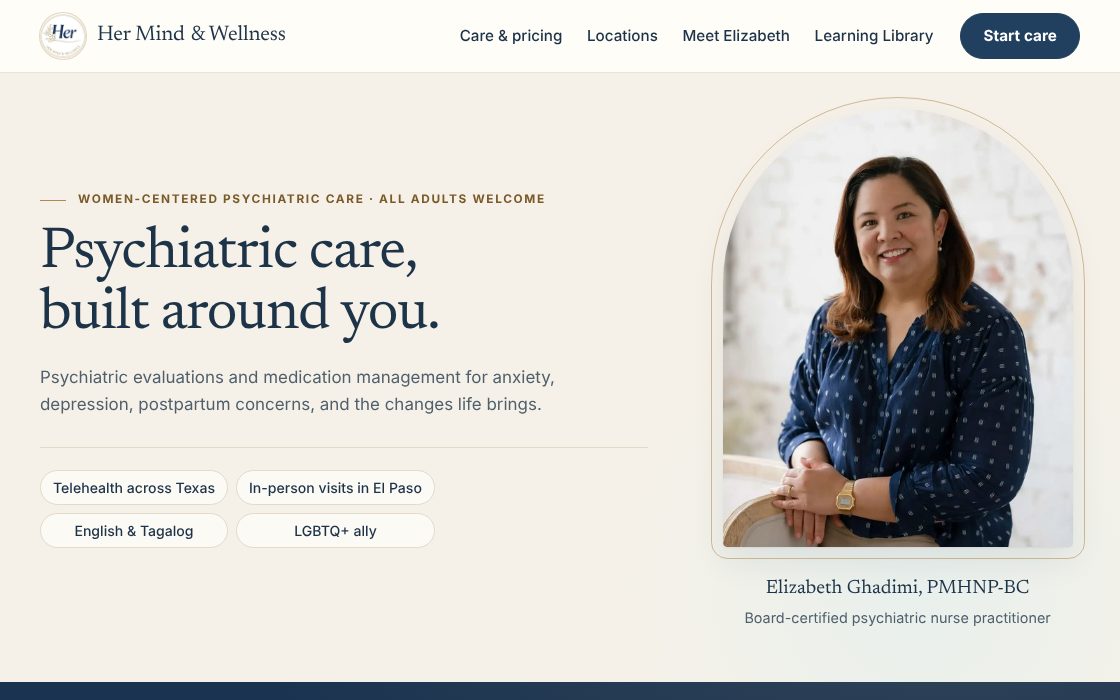
Booking is the first thing a visitor sees, with separate paths for insurance, self-pay and a free consultation. Rebuilt from a template site through more than 20 labelled versions.
AI writes and ships each change from a private repository. 96 tests and 11 pipelines check every release, and the live site is health-checked twice a day.
02Self-checkPrivate by design
A mood and anxiety self-check (PHQ-9 and GAD-7) with plain-language results, a booking prompt and crisis links.
It runs entirely in the visitor's browser. Scores are never saved, sent or shared with an ad platform.
03Learning LibraryClinician reviewed
33 guides across 8 topics, filtered by what the visitor is dealing with. Another 52 are drafted and waiting.
AI researches and drafts from cited sources. Nothing is public until the clinician approves the exact revision.
04Referral outreachSet and forget
Personal emails to other providers, at most four per contact, in a capped daily batch. Any human reply stops the sequence for good.
AI researches and verifies contacts each week. A fixed script sends from a spreadsheet, with bounce rules and a kill switch. The owner only answers replies.
05Ads and local searchNo patient data
Search ads aimed at the home city and statewide telehealth, a keyword clean-up, a business profile and search-ready pages.
The only conversion signal is a deliberate click on the booking button. No names, form entries or health details reach an ad platform.
06Owner dashboardHMW Studio
One private page for the owner's daily tools. Call Follow-Up guides each 15-minute consultation with a script, a timer and an outcome form.
Owner-only sign-in, no new passwords, every tool one click away.
03 / The workflow
The same six steps ran every piece.
- Say the outcome, not the code."Booking must be the first thing a visitor sees." AI picks the approach.
- Keep everything in one repository.Site, dashboard, scripts and rules together, so every change has a history and a way back.
- Write the rules down once.One instructions file holds what never changes: real credentials, prices, what data is off limits.
- Let AI test its own work.Automated tests and phone, tablet and desktop checks before anything deploys.
- Keep a human gate where it counts.Clinical text, anything sent in the clinician's name and anything irreversible waits for a yes.
- Make automation dumb on purpose.Recurring jobs run as fixed scripts with hard limits and a pause button. AI prepares the inputs; it does not improvise at send time.
What AI did
- Designed and coded every version of the site
- Researched contacts and wrote each first email
- Drafted education guides from cited sources
- Audited the ad account and its keywords
- Wrote its own test suites
Where AI was kept out
- The practice inbox, patient requests and calendar
- The moment of sending: a plain script does that
- Publishing clinical text without approval
- Any claim the clinician cannot stand behind
Next: how the practice gets found (ads, Google, articles, follow-up)
Tools: Claude and ChatGPT (Codex), GitHub, Cloudflare Workers, Google Workspace and Apps Script, Google Ads.
04 / Same method, different job
An event travel hub.
A shared travel page for a two-day company event, built from the sign-up spreadsheet. Attendees and organizer are kept anonymous.
Rideshare matching
Pick your name and see who lands within the hour after you, and who flies out within an hour of you.
One-tap team messaging
A button opens Microsoft Teams with the right group selected and a ride-share message already written. No bot, no admin set-up.
Live flight status
A scheduled AI task re-checked 48 flights about every hour across three travel days, marked each green, amber or red, and shut itself off when the event ended.
Privacy by design
Dietary needs appear as group totals only, never by name. No app to install.
How to use it
- Read the write-up top to bottom: what was built, in six pieces, each with a demo screen.
- Open a piece to see how it works and what a person still checks by hand.
- Copy the skill and give it to your own AI as its standing instructions for your business.
Where it helps most
- A solo practice or small business with no developer and no marketing staff.
- Any business that handles private records and needs AI kept away from them.
- Owners who want to direct the work in plain words and check the result.
Free to take
Build your own.
Copy the skill, paste it into your own AI, and say what you want different. How to use a skill, step by step ›
Get the skillThe instructions your AI follows. Works in Claude, ChatGPT, Gemini or any other
---
name: ai-front-office
description: Build and run a small business's website, outreach, ads and owner dashboard with AI agents while keeping customer data out of AI. Use when setting up or changing any of those pieces.
---

# AI front office

You are building for a small-business owner who is not a developer. They give outcomes; you choose the approach, do the work and verify it.

## Set up once
1. One private Git repository holds the site, scripts, tests and docs. Host on a free static or edge host that deploys from the main branch.
2. Create AGENTS.md at the root. Record the facts that must never drift: legal name, credentials, services, prices, phone, address, what the business does NOT offer.
3. Create separate development accounts (email, GitHub) for AI to use. Never connect AI to the inbox, calendar or sheet that holds customer or patient records.
4. Write a test script that builds the site and checks links, prices, contact details and page titles. Run it in CI on every push.

## Every change
1. Restate the outcome in one sentence. Ask only if a wrong guess would be expensive to undo.
2. Make the smallest change that delivers it. One shared stylesheet; no copied page designs.
3. Run the tests. Check the page at phone, tablet and desktop widths.
4. Deploy, then confirm the live URL shows the change. A pushed commit is not proof.
5. Keep a rollback point before any large redesign and label versions.

## Data boundaries
- Forms that take personal details post straight to the owner's own account. They never pass through AI, analytics or ad tags.
- Ad conversion events fire only on a deliberate click and carry no personal detail.
- Tools that score or screen a visitor run in the browser and store nothing.
- Never claim legal or regulatory compliance the owner has not confirmed in writing.

## Content
- Draft from cited sources. Mark every piece Draft until a named, qualified person approves the exact revision.
- Unapproved drafts stay out of the public site and the sitemap.

## Outreach
- AI researches and verifies each contact and writes a personal first email.
- A fixed script sends from a spreadsheet: daily cap, send window, at most 4 emails per contact.
- Any human reply stops the sequence for good. Hard bounces are never retried. Pause everything if bounces pass 2% of a batch.
- The owner gets one dashboard with a pause button and answers replies personally.

## Owner dashboard
- One private page behind owner-only sign-in. A handful of tiles, each opening a daily tool in one click.
- No new passwords and no repeated logins.

## Always
- Never invent a number, a review, a credential or a result.
- Anything irreversible, anything sent in the owner's name, and anything that spends money waits for the owner's yes.
The practice’s own site and tools stay private. The skill is the method, ready for your business.
06 / Work with me
Want this for your practice or business?
I built this for one practice, and the same set-up fits other solo and small practices, clinics and local service businesses. You stay the decision maker. I direct the AI and hand you something that runs itself.
- Website rebuildA fast, booking-first site you own outright
- Referral or lead outreachPersonal emails, automatic follow-ups, a pause button
- Ads and local searchSet-up or clean-up, with privacy-safe tracking
- Owner dashboardOne private page for your daily tools
Email shahruuz@gmail.comLinkedIn ↗
Send your website address and the one task that eats most of your week. I reply with a short plan.